Today was a small meeting with only Jared and I, due to Ian and Jaret both taking family vacations. Together, we accomplished creating a claw and giving the robot a better rear "wheel". We also discussed ideas for our claw and robot. In the programming department, I made a program that starts in a box and travels to the other end than turns around. To help with motors, I created a global variable for motor offset. In my opinion, this was one of our most successful meetings yet.
Here is a small sample of code from the program that turns at line (I did not define the functions):
task main()
{
int universal_speed = 50;
int light_threshold = 45;
straight(universal_speed, false);
wait1Msec(1250);
straight(universal_speed, true);
while(1 == 1)
{
while(SensorValue[Light_R] >= light_threshold)
{
straight(universal_speed, false);
}
straight(universal_speed, true);
turn_r(universal_speed, light_threshold);
}
}

Aurora City Schools - FTC Robotics Team Blog
Tuesday, June 28, 2011

Tuesday, June 21, 2011
June 21 Meeting
Today we practiced using the joystick to control the robot for the first time. We also started to explore the gyroscopic sensor and programing with it. Tyler also tried to follow a course by detecting lines. Overall a very good practice.
:)
:)
Saturday, June 11, 2011
New way to practice your RobotC at home
Thanks to Carnegie Mellon and The Computer Science Social Network (cs2n.org) we've got a great new software that you can download for free at home. I've tested some of our programs in the simulator and its pretty realistic. It will let you use the RobotC at home and simulate the Lego robot on your computer. You can download the software HERE.
http://dl.dropbox.com/u/25222170/RVW_NXT_TechAlpha.exe
For more information on the H99 NXT Simulator for RobotC try these links:
http://www.cs2n.org/h99
http://www.cs2n.org/h99/learn_lego
Try it out and let me know if what you think.
Next Practice: Tuesday June 14th at 4:00 PM,
Terry
http://dl.dropbox.com/u/25222170/RVW_NXT_TechAlpha.exe
For more information on the H99 NXT Simulator for RobotC try these links:
http://www.cs2n.org/h99
http://www.cs2n.org/h99/learn_lego
Try it out and let me know if what you think.
Next Practice: Tuesday June 14th at 4:00 PM,
Terry
Tuesday, June 7, 2011
Practice Tuesday June 7th 2011
Today we did things.... THINGS, not just any little "things". Big, no BIG things, we made a fast line following program that could line follow with 2 light sensors. It wass very fast and further reinforced my skills. We learned about gyro and acceleratorion sensors. We had to also attached a second light sensor and attached a gyro and acc. sensors. We sadly took down our sound and Ultra-Sonic sensor. :''(

Peace OUT

Peace OUT
Monday, June 6, 2011
Meeting Schedule for June 2011
Just a quick note about team practice next week. There is a conflict with scouts and our scheduled FTC meeting next Saturday.
After discussion with parents, it sounds like Tuesdays (4pm-6pm) will be a good backup day for weeks when Saturday won’t work. Through the summer, if there is a conflict with 2 or more of the team, just let me know and we will plan to meet the Tuesday before our regularly scheduled meeting.
- Practice: Tue June7th
- No Practice Saturday June 11th (Scouts)
- Practice: Tue June 14th
- No Practice Saturday June 18th (Tyler/Ian out of town)
- Resume Regular Practice: Saturday June 25th
Please let me know if you have any questions or concerns.
Saturday, June 4, 2011
June 4, 2011 Practice
 |
| Ian, Tyler, Jaret discussing a flow chart. Flowcharting is a necessary skill in the FTC. |
In this practice session, we worked on tasks like counting a total number of lines and line following with directional commands. Ian and Jaret worked on additional challenges and Jared was getting caught up after his baseball games. He was working on line following. I accomplished the main goals with support from the team. We all fixed the issues from practice two and quickly edited the program to get everything working. We also improved our note-taking skills by learning flowcharting. Our meeting would be called a good use of time by all team members and coaches. We are strongly looking forward to really getting to work with TETRIX sensors and servos.
 |
| Jared debugging code. |
Friday, June 3, 2011
Flowchart

I choose to use a "System" flowchart. You bassically use a diffrent shape for each command. This allows for easier reading and for good uniformed organization. They can be used for different purposes ie. solving a problem or designing a procces. In some cases, such as me, it may be easier to understand a flowchart than a program.
Monday, May 30, 2011
May 28 practice lessons learned?
I apologize guys, I should have checked the robot after the training meeting last Saturday. I didn't think anyone used it so I didn't worry about it.
Were you able to get the robot to work at all? What kind of troubleshooting did you try? What do we do if this happens on game-day? Should we invest in 2 robots if the team raises enough money? What do you think caused this problem? Do you think this kind of thing happens to professional engineers? If so, how do you think they handle it?
Again I'm sorry it didn't go as planned, but I'm glad you worked together to try and fix the problem. As much as I hate these kinds of problems - they can and do happen in all kinds of jobs. They also can teach us alot about our selves and our team. If you learned something about yourself, share it.
Thanks again to Mr. Ruehr for filling in while I was geeking-out in Baltimore. See you Saturday June 4th.
- Terry
Were you able to get the robot to work at all? What kind of troubleshooting did you try? What do we do if this happens on game-day? Should we invest in 2 robots if the team raises enough money? What do you think caused this problem? Do you think this kind of thing happens to professional engineers? If so, how do you think they handle it?
Again I'm sorry it didn't go as planned, but I'm glad you worked together to try and fix the problem. As much as I hate these kinds of problems - they can and do happen in all kinds of jobs. They also can teach us alot about our selves and our team. If you learned something about yourself, share it.
Thanks again to Mr. Ruehr for filling in while I was geeking-out in Baltimore. See you Saturday June 4th.
- Terry
Sunday, May 29, 2011
Homework
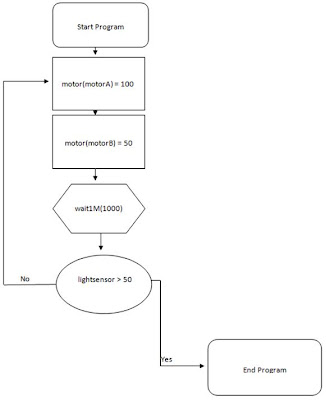
I chose to use a program flowchart. I chose this kind of flowchart because a program flowchart demonstrates how a program works within a system. These flowcharts show any and all user-interaction pathways by using boxes and arrows. Program charts can be large and complex. However, they are useful for mapping an entire program. The example I made would have the robot turn one way until it saw a dark line then it would stop.

Saturday, May 28, 2011
Second Team Meeting - May 28, 2011
At a team meeting with only Jared and I, we experienced a problem with the robot. Our goal was to recover the robot, but we failed. Due to this dismaying discovery, we just programmed and achieved all of the line following program and got a decent start with the "pill push" line task.
may 28th practice
this practice we did not get much acomplished because we were trying to figure out what was wrong with the robot because it would not start up and kept making a cliking sound we needed some help for this practice.
Sunday, May 22, 2011
my home work
I will present the rest of my homework at our next meeting it's not really a flow chart but it is similar enough
superjor's goals
I want to take F.l.l. one step further and get used to real programing code another one of my goals this year is to have fun which is the whole point of this competition
Friday, May 20, 2011
Tyler's Homework, May 20

The type of flowchart I researched was a system flowchart. This would be effective with our program mapping due to listing inputs and outputs with symbols, as well as data flow. My informtation source is eHow. Click here to veiw the specific page for the information.
Tuesday, May 17, 2011
First Team Meeting - May 14th 2011

Jared R., Tyler T., Jaret S. Discuss Team Goals
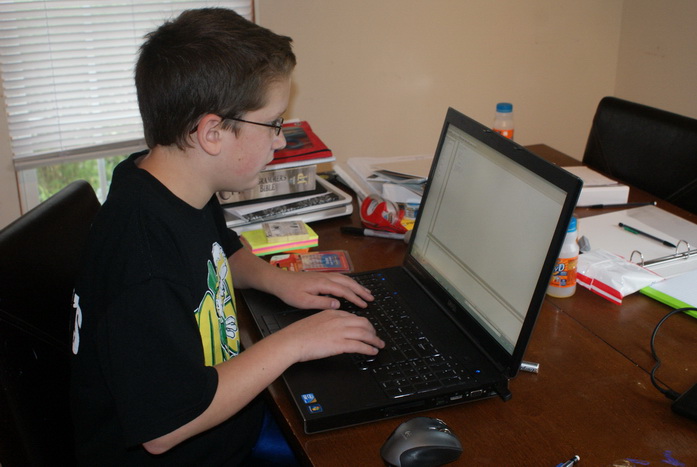
Jaret S. working with RobotC

Tyler T. working with sensors in RobotC
Monday, May 16, 2011
Subscribe to:
Posts (Atom)